
Court narrows SMS consent leeway, fix your opt-ins and vendor setup
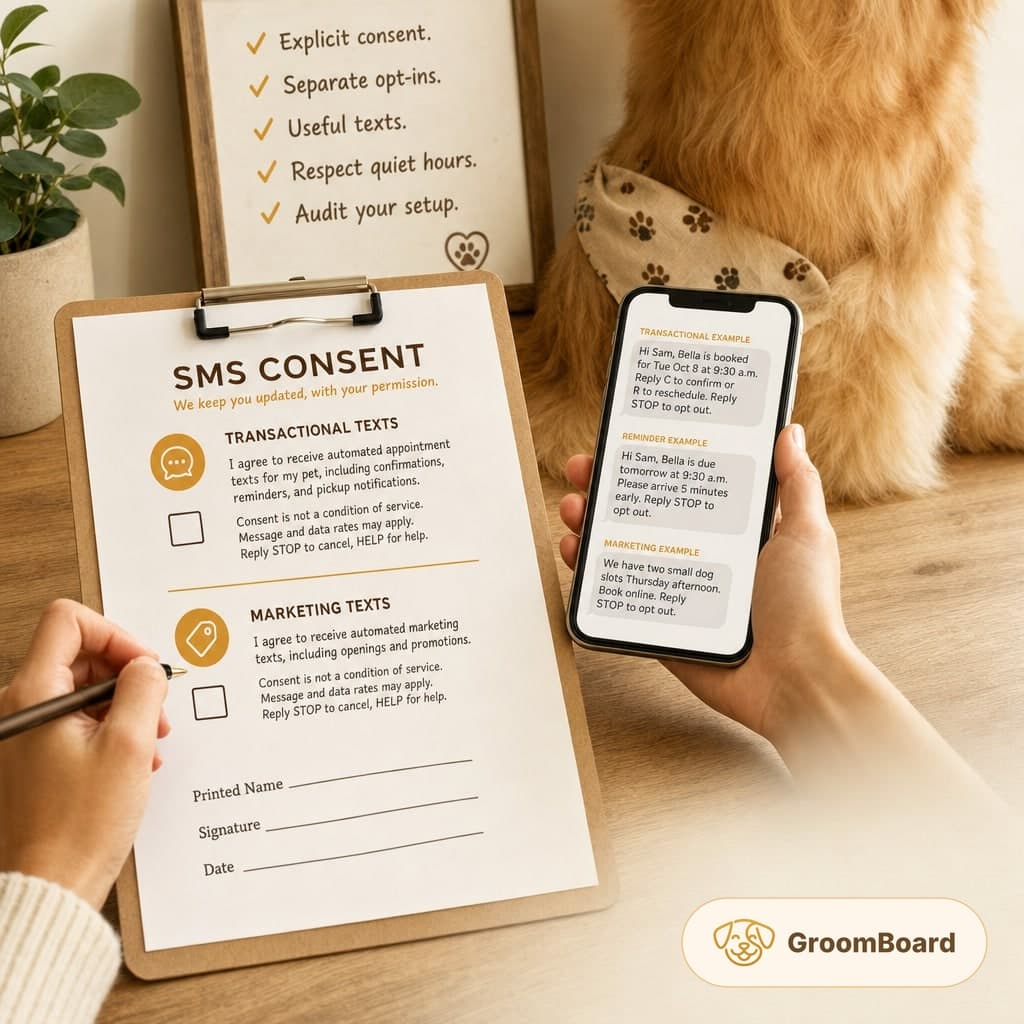
What to do about it
- Stop relying on prior business as permission to text, collect written opt-ins.
- Use two separate checkboxes, one for transactional texts and one for marketing.
- Include STOP to cancel, HELP for help, and expected frequency in every initial opt-in flow.
- Audit your vendor for opt-out handling, consent logging, quiet hours, and suppression lists.
- Purge or repermission inactive contacts, and document consent with timestamps and source.
What happened and who it affects
The National Law Review reports that a court found an insurance administrator could plausibly be treated as the initiator of text messages and that an established business relationship exemption was rejected. For any grooming business that uses SMS for reminders, openings, or promos, the takeaway is simple. Prior dealings are not a free pass to text. Get explicit permission and make sure your software only messages customers who gave it.
You can read the report at The National Law Review.
Make consent explicit and separate
Operate on the conservative side. Obtain written consent for any automated texts, even appointment reminders. Use two distinct opt-ins so customers can receive reminders without receiving marketing.
- Transactional texts, appointment confirmations, reminders, arrival ETAs, pickup ready, reschedule prompts.
- Marketing texts, last minute openings, new services, seasonal promos, reactivation offers.
How to capture consent:
- On paper, add two unchecked checkboxes with clear language. Keep the signed form on file. Snap a photo and store it in the client record.
- Online, use unchecked boxes with time and IP stamping. Save the form version and wording that was displayed.
- At the front desk or in the van, never toggle a consent switch for the customer. Ask them to do it and note who captured it.
If a customer gives a phone number by phone, send a one time confirmation text asking them to reply YES to enroll. Do not send automated reminders or promos until you have that affirmative response stored.
Tune your texts: transactional versus marketing
Send only what the customer agreed to receive. Keep the tone short and useful.
- Transactional template, Confirmation: Hi Sam, Bella is booked for Tue Oct 8 at 9:30 a.m. Reply C to confirm or R to reschedule. Reply STOP to opt out.
- Transactional template, Reminder: Hi Sam, Bella is due tomorrow at 9:30 a.m. Please arrive 5 minutes early. Reply STOP to opt out.
- Marketing template, Openings: We have two small dog slots Thursday afternoon. Book online. Reply STOP to opt out.
Respect quiet hours. A safe window is 8 a.m. to 8 p.m. local to the recipient. For weekend messages, stick to the same window.
Vendor and automation audit checklist
Even if a vendor or partner helps send texts, you can be treated as the sender in a dispute. Treat compliance as your responsibility. If your scheduling tool sends SMS reminders, like GroomBoard does, check these items this week.
- Opt-out handling, Does replying STOP immediately suppress all future texts, both transactional and marketing, from your number.
- Suppression sync, If a number opts out from one campaign, is it suppressed everywhere in your account.
- Consent gating, Can you restrict sends to contacts with documented consent types, transactional only, marketing, both.
- Audit trail, Can you see when and how consent was captured, paper upload, checkbox timestamp, double opt-in reply.
- Quiet hours, Can you schedule or throttle so messages only go out during your set hours.
- Number reputation, Are you using a local 10 digit number registered for business texting, not a rotating pool that confuses customers.
- List hygiene, Can you bulk remove or tag numbers that bounced, complained, or have been inactive.
If your vendor cannot meet these, turn off nonessential texting until you fix it. For example, keep same day reminders on for clients with documented consent, and pause marketing blasts entirely.
Copy and paste templates
Use this language in your intake and online forms. Adjust only to reflect your exact practices.
- Transactional opt-in: I agree to receive automated appointment texts for my pet, including confirmations, reminders, and pickup notifications. Consent is not a condition of service. Message and data rates may apply. Reply STOP to cancel, HELP for help.
- Marketing opt-in: I agree to receive automated marketing texts, including openings and promotions. Consent is not a condition of service. Message and data rates may apply. Reply STOP to cancel, HELP for help.
- Frequency disclosure, Typical frequency is 2 to 6 messages per appointment cycle for transactional texts, and occasional messages for marketing. Actual frequency varies by booking activity.
For phone enrollments, send: To confirm, reply YES to receive grooming texts from [Your Business]. Reply STOP to cancel, HELP for help.
Recordkeeping, timing, and edge cases
Keep a consent log per client. Include phone number, consent types granted, date and time captured, source, staff member, and any proof such as a form photo or YES reply. Store opt-out dates too. If a client opts out, do not text them again from any workflow until they opt back in with a fresh YES or a new form.
Re-permission inactive contacts. If someone has not visited or interacted in a year, remove them from marketing. If you want to reach them again, use email or a one time manual outreach to ask for a fresh opt-in, not an automated text.
Do not text third party numbers provided by someone else without that person’s direct consent. For minors, obtain consent from the adult account holder listed on the client record.
This briefing is operational guidance. Laws vary by jurisdiction and change. If you send any kind of automated texts, have a local attorney review your consent language and vendor setup once a year.