How to Get More Grooming Clients: 10 Proven Strategies
Whether you're just starting out or trying to fill gaps in your calendar, these 10 strategies will help you attract and retain more grooming clients.

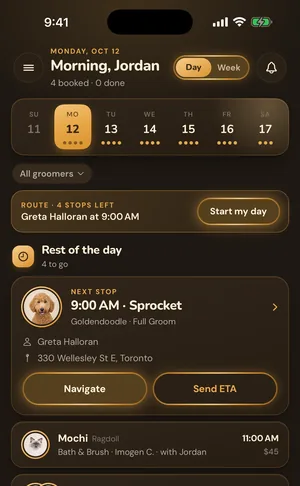
GroomBoard on your phone.
Your day, your route and checkout in your pocket. Sign in with the account you already have.
GroomBoard on your phone.
Your day, your route and checkout in your pocket. Sign in with the account you already have.
Client & Pet Management
Complete profiles for every client and pet: contact info, health records, grooming history, and photos in one place
Over twenty fields per pet, seven vaccine types with expiry tracking, and a profile that creates itself the moment a client books online.
Sarah Mitchell
(555) 234-5678 · sarah@email.com
Bella
Golden Retriever · 3 yrs
12
Visits
$780
Total
6 wk
Cycle
Grooming Notes
Sensitive around paws, go slow
Prefers puppy cut, 1 inch all over
Owner requests blueberry facial
Recent Appointments
Stop digging through paper files, spreadsheets, or group chats to find client details. GroomBoard gives every client a full digital profile with their contact info, address, pets, appointment history, and notes. Every pet gets their own detailed profile too: breed, weight, coat type, temperament, allergies, medical conditions, medications, vet info, vaccination records with expiry tracking, and special grooming instructions. When a client books online, their profile and pet records are created automatically. Before a groom, search by name, phone, or email and pull up everything you need in seconds. After the groom, snap before and after photos and send them to the client via text. Over time, you build a complete grooming history for every pet without any extra effort.
A client books through your page and GroomBoard creates their record and a profile for each pet they brought. If they have booked before, matched on their email, the existing profile is updated instead of duplicated. You never retype a client you already have.
Breed, weight, coat type, temperament, allergies, medical conditions, current medications, the vet name and number, and the standing instructions for the cut their owner likes. Mark a pet aggressive and the warning shows on the profile and on the appointment, so whoever picks up the clippers sees it too.
Every completed appointment logs itself to the pet with the date, service, status and price. Add a note after the groom if you want to. Do nothing and you still end up with a full record of every visit.
Step by step
Add clients manually with their contact info and address, or let online booking create their profile automatically. Add each pet with their breed, weight, temperament, health info, and grooming preferences. Takes about 2 minutes per client.
Record allergies, medical conditions, and medications on each pet profile. Add vaccination records with expiry dates. GroomBoard flags vaccines that are expired or expiring soon so you can let clients know.
Every completed appointment is logged to the pet's profile with the date, service, status, and price. Add groomer notes after each visit. Over time, you have a complete record of every groom without any extra work.
Upload before and after photos during appointments and send the results to clients via text. Before any groom, search the client name and see everything: temperament, allergies, last service, special instructions, so you're prepared every time.
Complete client profiles: name, phone, email, full address, notes, and appointment history all in one place
Detailed pet profiles with breed, weight, gender, coat type, temperament, and special grooming instructions
Health tracking for every pet: allergies, medical conditions, current medications, vet name, and vet phone number
Vaccination records with expiry dates: see at a glance which vaccines are current, expiring soon, or expired
Before and after photo uploads on every appointment: share the after photo with clients via SMS
Full grooming history per pet builds automatically with every completed appointment
Search clients instantly by name, phone number, or email. Find anyone in seconds
Aggressive pet warnings displayed automatically so you and your team are always prepared
Clients who book online have their profile and pets created automatically. No duplicate data entry
Multi pet bookings: clients can book up to 6 pets in a single booking, each with their own service
Service zone assignment: clients are automatically grouped by location for mobile groomers
Everything accessible from your phone so you can check pet details between grooms or on the road
Common questions
Each pet profile includes: name, species (dog, cat, or other), breed, weight, gender, coat type (smooth, double, wire, curly, long, silky, hairless), temperament (calm, friendly, nervous, excitable, aggressive), allergies, medical conditions, current medications, vet name and phone number, special grooming instructions, vaccination records with expiry dates, and a full grooming history. Over 20 fields designed for exactly what groomers need.
You can add vaccine records for each pet with the vaccine type (Rabies, Bordetella, DHPP, Canine Influenza, Leptospirosis, Lyme, or a custom type), the date it was administered, and the expiry date. GroomBoard automatically shows badges for vaccines that are expired or expiring within 30 days, so you always know a pet's vaccination status at a glance.
Yes. On any appointment, you can upload a before photo and an after photo. Photos are stored securely and linked to the appointment and pet. You can also send the after photo directly to the client via SMS, clients love seeing the results.
When someone books through your online booking page, GroomBoard automatically creates a client profile with their contact info and a pet profile for each pet they're booking. You don't have to reenter anything. If the client already exists (matched by email), their existing profile is updated instead.
Yes. The booking form supports up to 6 pets in a single booking. Each pet gets their own appointment slot scheduled back to back, with the service and details selected individually. Great for clients with multiple dogs.
The client list has a real time search that works across name, phone number, and email. Start typing and results filter instantly. You can also filter clients by service zone if you're a mobile groomer.
If you mark a pet's temperament as aggressive, GroomBoard displays a visible warning banner on their profile and in the appointment view. Your whole team sees it before the groom starts. You can also add detailed handling notes in the special instructions field.
Add clients one at a time through a simple inline form on the clients page: name, phone, email, and address. Most groomers add their regular clients during the free trial (takes a few minutes each) and let new clients auto populate through online booking going forward.
Yes. Every client profile shows their total appointments, total pets, and last visit date. You can see their full appointment history with dates, services, status, and pricing. Each pet also has its own grooming history showing every appointment they've had.
From the blog
Whether you're just starting out or trying to fill gaps in your calendar, these 10 strategies will help you attract and retain more grooming clients.
Everything you need to know about starting a dog grooming business from scratch, licensing, equipment, pricing, marketing, and the software that keeps it all running.
No shows cost the average groomer hundreds per month. Automated SMS reminders are the simplest fix, here's how to set them up.
Start your 7 day free trial. No credit card required. Set up in minutes and see GroomBoard in action.