
Smart Calendar & Scheduling

Smart Calendar & Scheduling

See your whole week at a glance with a visual calendar

Day, week and month views, drag to reschedule, and a conflict check that runs before the move commits.

Wednesday, Mar 18

5 appointments · lunch blocked at noon

!

Running 20 min behind · Max is next

9 AM

Bella

+20 min

Full Groom

11

Max

Bath & Brush

12 PM

Lunch

1

Charlie

Nail Trim

2

Luna

Full Groom

4

Rocky

Puppy Cut

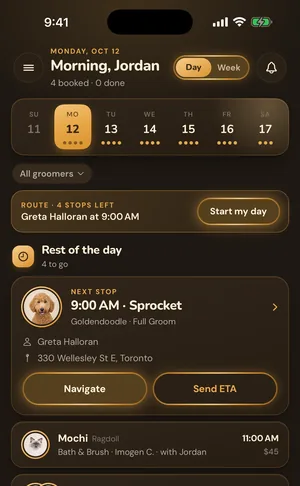
Your calendar is the command center of your grooming business. GroomBoard gives you a clean, visual calendar that shows your day and week at a glance. See every appointment with the client name, pet, service, and time slot. Appointments from online booking appear automatically. Multi-groomer view lets salon owners see everyone's schedule side by side. Built-in double-booking prevention means you never accidentally overlap appointments.

Drag it. If it collides, it does not move.

Reschedule by dragging the appointment to the new slot. GroomBoard checks the move against your hours, your blocked time and everything already booked, and refuses the drop rather than quietly creating an overlap you find out about on the day.

The running late banner.

When an appointment goes past its slot the calendar says so at the top, so the person who needs a heads up is the next client rather than a surprise. Running late is a normal day, not an error state.

Rebook the next six weeks in one tap.

A client on a regular cycle does not need six separate bookings. Recurring rebooking creates the next four to six weeks of appointments at once, on the schedule that pet already keeps.

Step by step

How It Works

1

Set your availability

Configure your working hours, break times, and days off. The calendar only shows bookable slots during your available hours.

2

Bookings fill your calendar

Whether clients book online or you add appointments manually, everything appears on your calendar in real time.

3

Manage your day

Check your calendar each morning to see your full schedule. Tap any appointment for client details, pet info, and grooming notes.

Everything included

Visual day and week view shows your entire schedule at a glance

Online bookings appear automatically, no manual entry

Built-in double-booking prevention keeps your schedule clean

Multi-groomer view for salons with 2-5 groomers

Tap any appointment to see full client and pet details

Block off lunch breaks, days off, and holidays easily

Month view shows 30 days at a glance for long-range planning

Drag and drop appointments to reschedule: conflicts caught before the move commits

Running-late banner surfaces appointments that have gone over, so you can notify the next client

Recurring rebooking auto-creates the next 4 to 6 weeks of appointments in one tap

Common questions

Frequently Asked Questions

Can I see multiple groomers' schedules at once?

Yes. The Salon plan ($39/mo) includes multi-groomer calendar view, so you can see everyone's schedule side by side and prevent conflicts.

What happens if two people try to book the same slot?

GroomBoard has built-in double-booking prevention. Once a time slot is booked, it's no longer available on your booking page. Conflicts are impossible.

Can I manually add appointments?

Yes. You can add appointments directly from the calendar for walk-ins, phone bookings, or existing clients. The appointment form lets you select the client, pet, service, and time.

Ready to try smart calendar & scheduling?

Start your 7-day free trial. No credit card required. Set up in minutes and see GroomBoard in action.