
FCC clarifies TCPA opt-outs, 30-day grooming compliance plan
What to do about it
- Inventory every tool that can text or auto-call, then enable a universal STOP that suppresses all nonessential messages within one business day.
- Separate transactional messages from marketing, limit appointment flows to two or three texts, and send during daytime hours only.
- Capture explicit consent for marketing, record how and when it was given, and retain logs for at least five years.
- Update intake forms, website wording, and staff scripts so opt-out and re-consent are handled consistently across systems.
- Test your settings with real numbers and document the results, then recheck monthly for drift or staff workarounds.
What changed and who it affects
The National Law Review reports that the FCC adopted clarifying changes to the TCPA Revoke All rule, with effectiveness set for 30 days after publication. If you send SMS reminders, ready for pickup alerts, or any automated calls, this touches your shop. Expect tighter expectations that a consumer can revoke consent broadly, and that you must honor that consistently across your messaging systems. For the legal details and timing, see The National Law Review.
Your 30-day compliance plan
Work in four short sprints. Block one hour per step and get it finished.
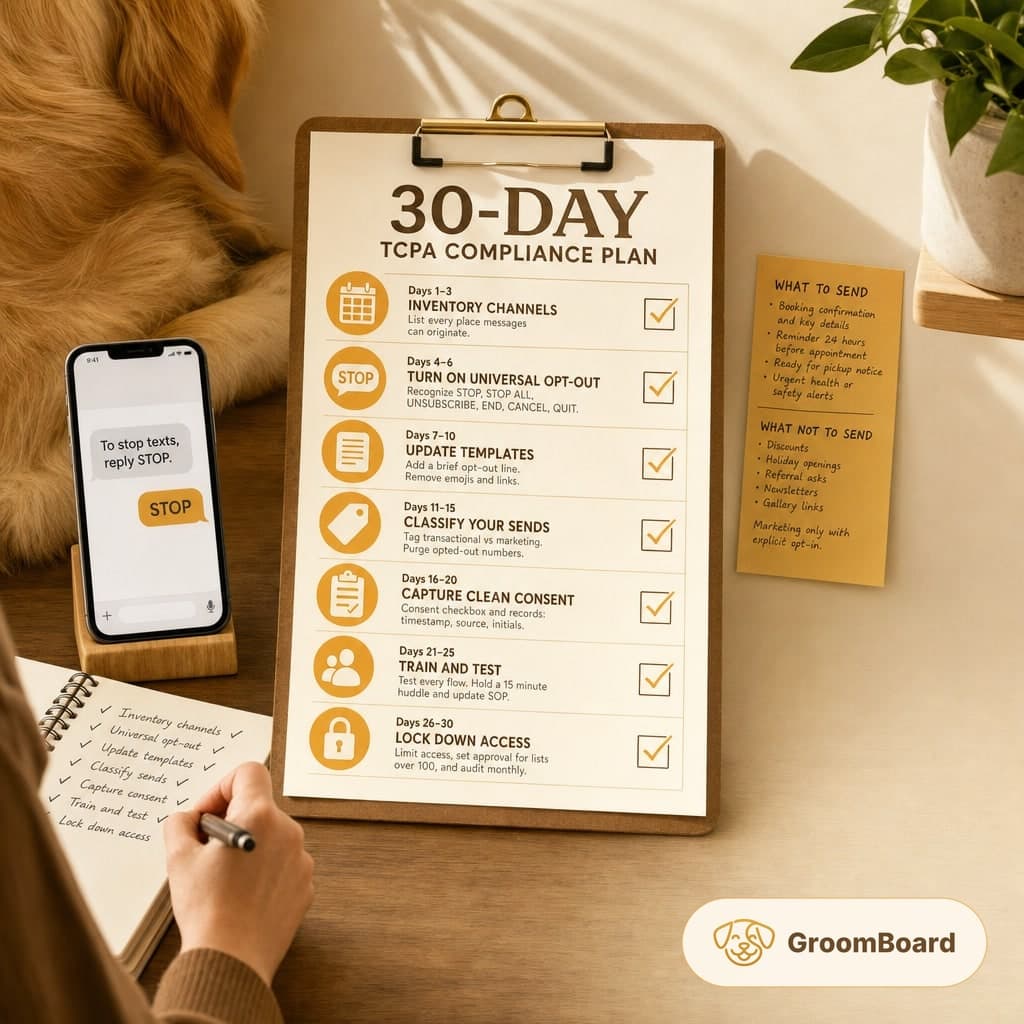
- Days 1 to 3: Inventory channels. List every place messages can originate. SMS platform, your CRM, booking app, two-way texting on your business line, voice drops or dialers, and any marketing tool. Note where consent is stored and which staff can send messages.
- Days 4 to 6: Turn on universal opt-out. Configure STOP handling so one reply suppresses all nonessential texts to that number across your account. Also recognize common variants such as STOP ALL, UNSUBSCRIBE, END, CANCEL, and QUIT. Set suppression to take effect immediately, with a hard deadline of one business day.
- Days 7 to 10: Update templates. Add a brief opt-out line to the first message in any thread. Example wording without fluff: To stop texts, reply STOP. Remove emojis and links from reminders to reduce carrier filtering.
- Days 11 to 15: Classify your sends. Tag each template as transactional or marketing. Purge opted-out numbers from any marketing audience. If your tool supports it, block marketing sends by tag or list rather than by memory.
- Days 16 to 20: Capture clean consent. Add a consent checkbox to online booking and digital intake. At the counter, use a one-line initial on the client card. Store the timestamp, source, and staff initials. Keep these records for at least five years.
- Days 21 to 25: Train and test. Run two test numbers through every flow. Opt in, book, receive all messages, then opt out and confirm suppression. Hold a 15 minute huddle with staff and update your written SOP.
- Days 26 to 30: Lock down access. Limit who can send blast messages, require manager approval for any list over 100 contacts, and set monthly audits on opt-out handling.
What to send, what not to send
Transactional messages are tied to an appointment or a safety matter. Examples that are usually acceptable once a client has provided their number:
- Booking confirmation and key details, for example drop-off time and address.
- Reminder 24 hours before the appointment.
- Ready for pickup notice.
- Urgent health or safety alerts related to an in-progress groom.
Keep this tight. Two or three texts per appointment cycle is plenty. Send during daytime hours. A safe window is 9 am to 7 pm local time to reduce complaints.
Marketing messages are any sales or promotional content. Discounts, holiday openings, referral asks, newsletters, or gallery links belong here. Send marketing only to clients who have explicitly opted in, and cap blasts to once per month per client unless they asked for more.
Build a clean consent and opt-out record
Documenting consent is not optional if you want to defend your shop later. Use this structure:
- Fields to keep: consent type transactional allowed, marketing allowed, date and time, capture method online form, paper, phone, staff initials, and the phone number verified.
- Re-consent path: if a client opted out, do not text them asking to opt back in. Offer re-consent at check-in, on your website, or by email. Log the new consent the same way as any other opt-in.
- Cross-system sync: when a number is opted out, mirror that status in every tool you use. If your systems do not sync, keep a shared Do Not Text list and import it weekly.
Update scripts and client touchpoints
Give staff short, standard wording and remove improvisation. Add these touchpoints:
- Phone booking: confirm the number and ask for permission to send appointment texts. If they decline, mark Do Not Text immediately.
- Front desk intake: a one-line consent on your card or tablet. Include a checkbox for marketing permission, leave it unchecked by default.
- Website and forms: include a clear line near the phone number field that transactional texts are used for appointments, and that clients can opt out at any time by replying STOP.
- Hard cases: if a client says stop texting me in person or by email, treat that as a revoke all and update the record the same day. Send no further nonessential messages to that number.
Settings to verify in your tools
- Keywords: STOP, STOP ALL, UNSUBSCRIBE, END, QUIT, and CANCEL should all block future sends. HELP should return your shop name and contact number.
- Suppression scope: confirm that a blocked number is removed from all campaigns, templates, and automations, not only the thread it replied to.
- Quiet hours: set a send window to prevent late evening or early morning texts.
- User permissions: restrict blast sending to the owner or manager. Require a review before any message goes to more than 100 contacts.
- Logging: export a monthly CSV of consents, opt-outs, and message logs. Store with your booking backups.
- If you use GroomBoard for reminders and online booking, check that STOP applies account-wide and that your intake form captures marketing consent separately from transactional messages.
Keep it simple. Fewer messages, clearer permission, and a visible off switch will protect you from complaints and carrier filtering while keeping reminders effective.