
FCC rethink on robocall rule, tighten your SMS opt outs now
What to do about it
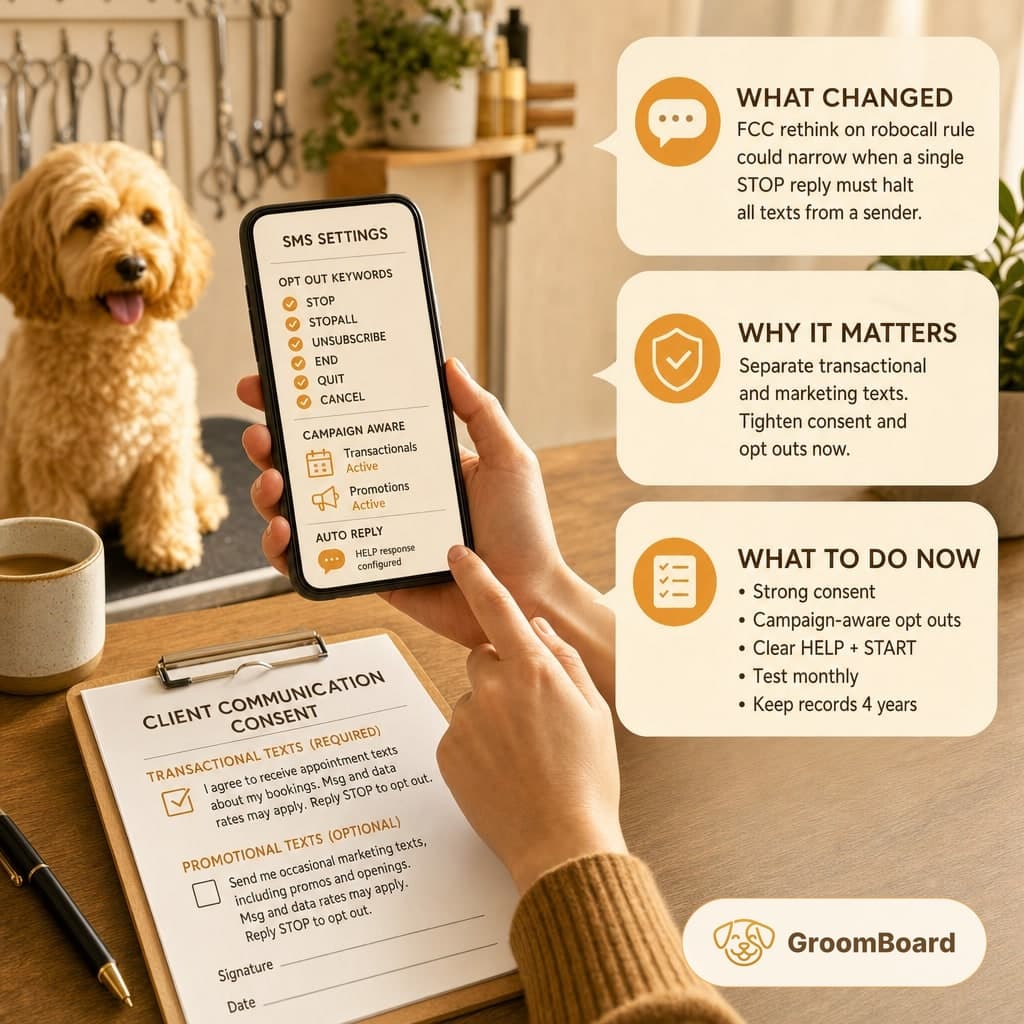
- Segment transactional reminders from promotional texts, and maintain separate opt out lists for each.
- Require explicit written consent for marketing texts, and log timestamp, source, and IP or device details.
- Configure STOP to work instantly, send one confirmation, and suppress future messages in the correct campaign.
- Test your own number monthly: STOP, START, HELP, and uncommon phrases like CANCEL and UNSUB.
- Document policies and train staff, and keep consent and opt out logs for at least four years.
What changed and why groomers should care
According to a report from cutoday.info, the FCC is moving to scale back the Revoke All robocall rule. If finalized, this could narrow when a single STOP reply must halt all texts from a sender. For grooming shops that rely on SMS for appointment reminders and occasional promos, the practical impact is how you separate transactional and marketing texts, and how your system processes opt outs.
You do not need to predict the final rule to stay safe and efficient. Tighten consent and opt outs now. If the rule changes, you will be positioned to adjust with a settings tweak, not a scramble.
Consent, segmented lists, and what to collect
Run two lanes for texting, because the standards for each are different in practice:
- Transactional: appointment confirmations, reminders, arrivals, pick up notices, wait list notifications, and safety related messages.
- Promotional: discounts, openings to fill gaps, new services, holiday campaigns.
Our guidance on consent and data to store:
- Transactional messages: get clear consent during booking or intake. A checkbox with plain language is best. Example copy: I agree to receive appointment texts about my bookings. Msg and data rates may apply. Reply STOP to opt out.
- Promotional messages: require explicit written consent. Separate checkbox, not pre checked. Example copy: Send me occasional marketing texts, including promos and openings. Msg and data rates may apply. Reply STOP to opt out.
- Log the evidence: timestamp, source screen or form name, user ID, phone number, IP or device if captured, and the exact language shown at the time. Keep these records at least four years.
Configure opt outs that work in the real world
Do not rely on one global list if your software can separate campaigns. Set opt outs to be campaign aware, and be prepared to honor a global STOP if your vendor or carriers enforce it. Practical settings to implement now:
- Keywords: STOP, STOPALL, UNSUBSCRIBE, END, QUIT, CANCEL. All should immediately suppress messages. Send one confirmation and no further texts in that campaign.
- Speed: suppression should be instant, and absolutely before the next scheduled send. Check that batch reminders do not queue before suppression applies.
- Campaign scope: a STOP on promos should not silence appointment reminders unless your legal counsel requires a global stop. If your platform cannot distinguish today, plan to move to one that can.
- HELP response: configure an automatic reply that identifies your business name, a contact number or email, and basic instructions like Reply STOP to opt out.
- START or UNSTOP: allow clients to re opt in easily, and log that event the same way you log opt in on a form.
Test your setup monthly. Text your business number these messages from your own phone: STOP, START, HELP, CANCEL, UNSUBSCRIBE. Confirm you receive the right responses and that future sends behave correctly.
Update intake forms, policies, and message templates
This is housekeeping you can finish in an afternoon:
- Intake forms: separate the two checkboxes for transactional and marketing texts. Make the language short and readable. No tiny gray text. Capture signatures for paper forms, then scan and attach to the client profile.
- Online booking: add both consent options and require at least the transactional one to finalize an appointment. For marketing, keep it optional and unselected by default.
- Policy page: add a clear SMS section clients can reference. Suggested language: We send appointment texts related to your bookings. You can opt in to promotional texts. Reply STOP to opt out at any time. Message frequency varies. Msg and data rates may apply.
- Message templates: include your business name at the start, keep to 160 characters when possible for deliverability, and end promos with Reply STOP to opt out. You do not need that tag on every transactional reminder if your HELP response covers it, but it is still a safe practice.
- Quiet hours: schedule sends during business hours in the client’s local time. For reminders, aim for 24 to 48 hours before the appointment and again 2 to 3 hours prior if no confirmation.
Vendor settings and a quick audit checklist
Most small shops use a 10 digit long code service through their software. Carriers expect brand and campaign registration for A2P messaging, accurate use cases, and working STOP and HELP flows. Ask your provider these questions today:
- Can you separate transactional and promotional campaigns with distinct opt outs and reporting
- How fast do opt outs take effect for scheduled batches and triggered reminders
- Which opt out keywords are recognized, and can we add our own aliases
- Do you log consent and opt out events with timestamps that I can export for records
- Are our brand and campaigns registered correctly for 10DLC, and are there any outstanding compliance flags
If your tool cannot meet these basics, consider switching or adding a lightweight SMS service that integrates with your calendar. GroomBoard, for example, supports online booking, SMS reminders, and client records, and can collect deposits through Stripe, which helps tie consent to a payment event.
What to watch as the FCC finalizes
The headline suggests the rule may narrow when a single STOP must halt all messaging. Operate as if you may need either model and keep the change isolated to a switch in your SMS settings. The safest posture is clear consent, clean separation of campaigns, fast suppression, and complete logs. When the rule is finalized, update your policy language to reflect whether STOP applies account wide or per campaign, then notify clients in your next appointment confirmation.
None of this is legal advice. It is practical operating guidance so your day is not disrupted by blocked numbers, complaints, or lost confirmations. Tighten the basics now and you will be fine regardless of how the wording lands.